AI video creator in ChatGPT
Create AI Videos Right in Your ChatGPT Chat
AI Video Creator by KING AI turns a written scene or a still photo into a short video clip without leaving ChatGPT. Pick the model, aspect ratio, resolution, and length in the King AI card, see what it will cost, and start the render with one click.
- Text to video with Seedance 2.0, 2.0 Fast, 2.0 Mini, and 2.5
- Bring a product shot or portrait to life with image to video
- Clips from 4 seconds up to 30 seconds, in 16:9, 9:16, 1:1, and more
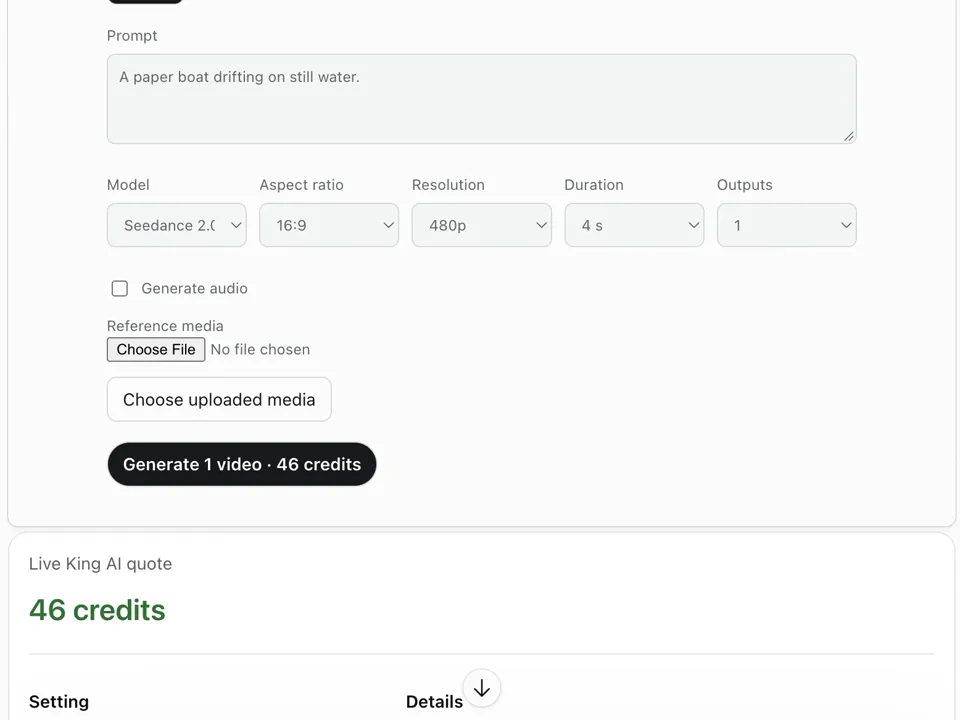
- The credit total is shown before anything is charged
No subscription required. Each video uses credits from your King AI account, and the card shows the total for your settings first. A 4-second 480p Seedance 2.0 Mini clip costs about 46 credits; an 8-second vertical 720p clip about 197.
From One Sentence to a Playable Clip
Three steps
ChatGPT fills in the settings for you, but nothing is rendered or charged until you press Generate in the King AI card.
- 1
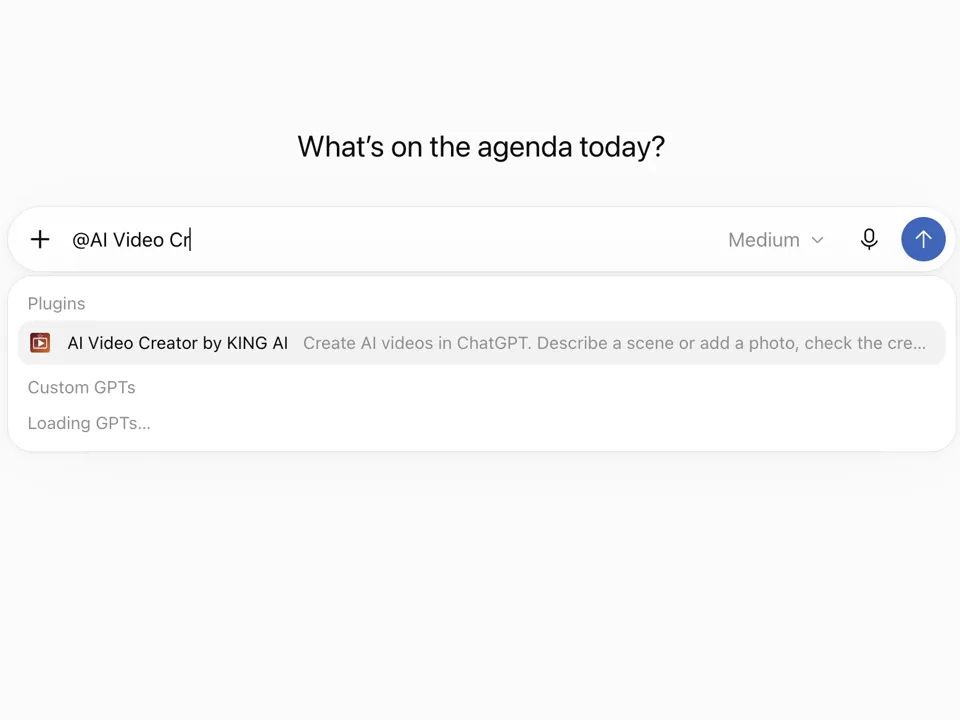
Pick AI Video Creator by KING AI
Type @AI Video Creator in the ChatGPT message box, choose it from the plugin list, and sign in to King AI the first time you use it.
- 2
Describe the Scene and Review the Card
Say what should happen, how the camera moves, and how long the clip is. The card fills in the prompt, model, aspect ratio, resolution, and duration, and shows the credit total. Adjust anything first.
- 3
Generate Once and Play It
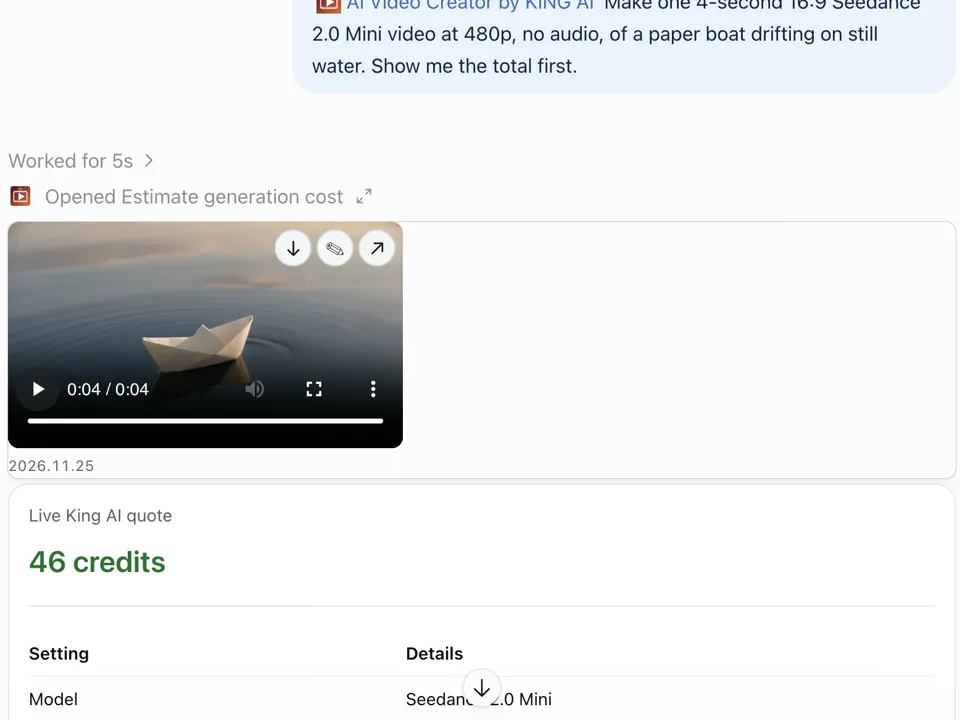
Press Generate one time. The card moves from Queued to Processing, and the finished clip plays in the same spot with download and open-original buttons.
Made with King AI
Clips You Can Ask For
The paper boat is the exact clip from our ChatGPT test run. The other clips were made with King AI video models, each paired with a request you could send to the plugin.
Paper Boat on Still Water
Try asking
“Make one 4-second 16:9 Seedance 2.0 Mini video at 480p, no audio, of a paper boat drifting on still water.”
Skatepark Motion
Try asking
“Create a 5-second clip of a skateboarder balancing on a board as they roll across a sunlit skatepark, camera tracking alongside.”
Winter to Summer
Try asking
“Make a 5-second video where a cyclist riding down a snowy street transforms into a surfer on a sunny ocean wave.”
Flowing Fabric Portrait
Try asking
“Animate my portrait photo: flowing white fabric drifts around the model while the camera slowly moves in.”
Prompt tips
Direct Your Video Like a Shot List
Say what moves and how the camera moves
Video models need motion. Describe the action, then the camera: push in, orbit, track, or hold still. "A glass marble rolls across a table, low camera following it" gives the model a clear shot.
A glass marble rolls across a sunlit wooden table. Low camera follows it from the side. 16:9, 5 seconds.
Start from a photo for consistent subjects
Add a product or portrait photo in the King AI card and describe only the motion. The subject keeps its shape, colors, and label from your photo.
Use my photo. Keep the sneaker exactly as it is; it slowly rotates on a white platform with soft studio light.
Match the shape to where it will be posted
Ask for 9:16 for Reels, Shorts, and TikTok, 16:9 for YouTube and websites, and 1:1 for feeds. Saying it up front saves a second render.
Vertical 9:16, 8 seconds: ocean waves at sunset with a slow drone flyover. No text.
Draft short, then upgrade
Run a 4-second 480p draft to check the motion. When it looks right, ask for the same scene longer or at 720p or 1080p.
Same scene as the last video, but 10 seconds at 1080p. Keep the prompt and camera move the same.
What is AI Video Creator by KING AI?
It is a ChatGPT plugin that creates short AI videos with King AI video models. You describe a scene or add a photo, review the settings and credit total in the King AI card, and the finished clip plays in the same chat.
How do I start creating a video?
In ChatGPT, type @AI Video Creator, pick AI Video Creator by KING AI, and describe the clip, for example "Make a 5-second 16:9 video of a paper boat drifting on still water". Sign in to King AI the first time, then click Generate in the card when the settings look right.
How much does one video cost?
It depends on the model, resolution, duration, and audio. The card shows the total before you confirm. For example, a 4-second 480p Seedance 2.0 Mini clip without audio costs about 46 credits, and an 8-second vertical 720p clip about 197 credits.
Which video models and lengths are available?
Seedance 2.0 (up to 4K), Seedance 2.0 Fast, Seedance 2.0 Mini, and Seedance 2.5. Most models make 4 to 15 seconds, and Seedance 2.5 goes up to 30 seconds. Ask the plugin to list video models to see what is available right now.
Can it turn my photo into a video?
Yes. Add a reference photo in the King AI card and describe the motion. Models that support image to video keep the subject from your photo and add movement and camera motion.
Will ChatGPT spend my credits on its own?
No. ChatGPT can only prepare the settings and show the total. A video is created only when you click Generate in the card, and each click creates exactly one task.
Can this plugin make still images?
No. AI Video Creator by KING AI creates videos only. For still images, use the separate AI image generator by KING AI plugin.
How long does a video take to render?
Usually a few minutes, sometimes longer when the provider is busy; our 4-second test clip took about 10 minutes. The card shows Queued and then Processing, and the clip plays in place when it is done. Your videos are also saved in My Videos on king-ai.net.
What data does the plugin use?
Only what it needs to make the video: your prompt, the settings you pick, any reference files you add, and your King AI account to check credits and save results. See the King AI privacy policy for details.