





Keep a Consistent Character Across New Stills
Record the face once, then test that person in a new picture. Open Image and use the model name the form lists.
Locks, Sheet, Then a New Place
A Consistent Character Is the Same Person in a Later Still
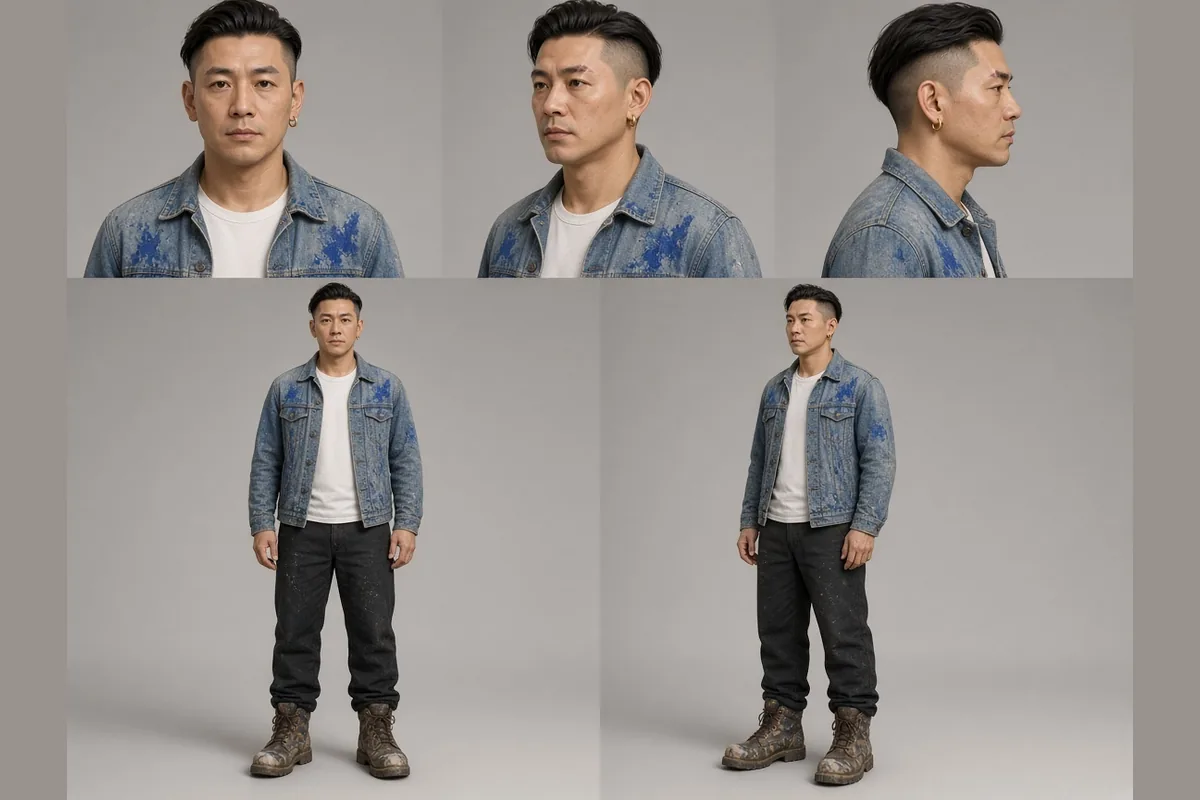
A consistent character, on this page, is one recognizable person carried from a studio sheet into a later picture. Jun, a fictional mural painter, is the example. His consistent locks are a shaved-side undercut, a pale scar through the left eyebrow, a small gold hoop in the right ear, and faded denim with cobalt stains. A character sheet prompt names those locks once. Character consistency is the later test: the place may change, and the person should not. These pictures were made for the guide.
Write the Locks Before the Consistent Character Leaves the Studio
This consistent character study uses five views on a plain warm-gray ground: front, three-quarter, profile, and two full-body angles. Keep the hoop in the right ear, the scar on the left eyebrow, and one side shaved. A second hoop or a full head of hair means it is not a consistent reference yet.
- Name four consistent locks
- Keep every view consistent
- Leave the studio ground plain
Check the Scar, Hoop, and Undercut on a Consistent Character
A close portrait shows whether a consistent character is readable. The scar is a pale line through the left eyebrow. The hoop sits in the right ear, and one side is shaved. If the hoop drops or the undercut fills in, do not use the frame for the next consistent still.
- Read the consistent scar line
- Keep the hoop consistent
- Reject a filled-in undercut

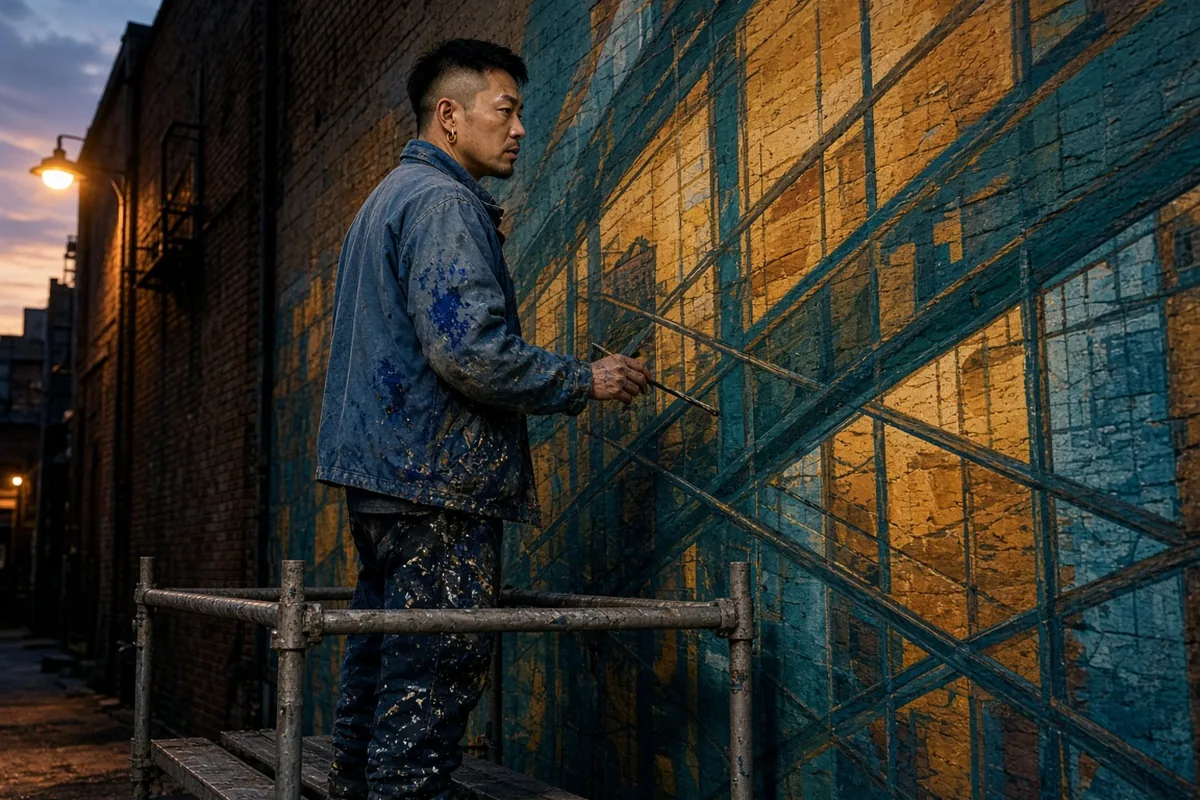
Hold the Consistent Character on a Scaffold at Dusk
Jun paints a teal-and-amber tram-line and window-grid mural from a scaffold on a brick warehouse. The lamp and the wall are not locks. A consistent character still shows the undercut, the left-brow scar, the right-ear hoop, and the cobalt denim. Keep that person consistent beside the sheet.
- Let the mural be new
- Keep four consistent locks
- Compare the consistent frame
What Makes a Consistent Character Hold
Three checks turn a hope for the same person into a consistent character you can accept or reject.
Locks Are the Consistent Character
A consistent character is a short list, not a mood: undercut, left-eyebrow scar, right-ear hoop, and cobalt on denim. Write it before the scaffold. If a lock is hard to see, that consistent still should not travel.
The Sheet Is a Reference You Can Attach
Send a passed view back into Image as a reference image, inside the count, size, and types on that row. Grok Imagine Image 2 edits attached pictures. Other rows stay on image-to-image. The file guides the next consistent character, and you still compare the locks.
A New Place Is the Consistency Test
Character consistency appears when the room and the job change. The warehouse, the lamp, and the teal grid are the change. A studio sheet alone has not tested a consistent character in a new still. Pass the mural only when the same four locks are obvious in both frames. Dusk color is not that consistent check.
Order the Consistent Character the Way a Face Breaks
Sheet, Then Close Read, Then a New Place
Start with the locks, prove them up close, then move the person. Submit each consistent still in Image after the decision is written down.
- 1
Write the Character Sheet Prompt First
Put the four locks in one character sheet prompt and ask for five views on a plain ground. Pose may change. Locks may not. That sheet is the consistent character reference for later stills. In Image, pick a listed row, read its credit line, and submit this consistent pass before the warehouse.
- 2
Attach the Accepted Portrait to the Next Still
Check the scar, the hoop, the undercut, and the stains before a wider consistent character. Attach a passed close frame for the scaffold still, inside the printed limit. Ratio and resolution follow that row. Qwen Image 3 and Qwen Image 3 Pro can show a seed, a negative prompt, and Enhance prompt under Advanced options. The number does not keep a consistent face by itself.
- 3
Keep the Still Only After the Lock Check
Read the four locks before the sunset, then download the consistent character. If one fails, change that phrase and run the consistent still again. For a clip, open Video and a listed Seedance row. Create Character offers Upload Photo or Generate. Generate lists Gemini 3 Pro Image Preview and Gemini 2.5 Flash Image (Nano Banana), plus ratio and quality when shown. Select Character inserts the token. Outside image-to-video and a first-and-last frame, the token attaches that saved picture. It is a reference, not a lock.
What does a consistent character mean on this page?
A consistent character is Jun, a fictional mural painter you can recognize after the picture changes. The consistent locks are the undercut, the scar, the hoop, and the cobalt denim. The mural may be new.
How should a character sheet prompt name Jun?
A character sheet prompt names the undercut, the scar, the hoop, and the stained denim, then asks for five plain-ground views. Pose may change. Keep that sheet a consistent reference, not a second scene.
What is character consistency when the place changes?
Character consistency compares two pictures. The dusk frame may add the scaffold and the teal grid. A consistent character passes only when the four locks still belong to Jun.
Which image rows can carry a reference still?
Use the listed row: Grok Imagine Image 2, Qwen Image 3, Qwen Image 3 Pro, Seedream 5 Pro, GPT Image 2, Nano Banana 2, Nano Banana Pro, Flux 2 Pro, or Flux 2 Flex. Free choices use another path. Then run that consistent character brief.
What happens when I attach a picture?
Attached pictures make an image-to-image attempt, inside the count, size, and types the form prints. Grok Imagine Image 2 edits those files. Other rows stay on image-to-image. Ask the new still to keep a consistent character.
Will a seed keep the same face?
A seed does not hold the face. Qwen Image 3 and Qwen Image 3 Pro can show one under Advanced options, with a negative prompt and Enhance prompt. Log it for the next consistent still, and change the prompt if the scar moves.
How does Create Character reuse a still?
On a listed Seedance row, Create Character opens New Character: Upload Photo or Generate. Generate lists Gemini 3 Pro Image Preview or Gemini 2.5 Flash Image (Nano Banana). Outside image-to-video and first-and-last frame, the token attaches that picture. It does not lock a consistent character.
Which locks should I check on the mural still?
Check the undercut, eyebrow, ear, and denim before the sunset. A brush is not a lock. A missing hoop means that consistent character failed.
What frame suits a sheet or a close portrait?
Use a listed ratio. A wide consistent character sheet can use 16:9 or 21:9. A closer consistent read can use 3:4 or 4:5. Keep the ear off the crop. Some rows show no resolution control.
How do I compare two consistent stills?
Save the prompt, model, ratio, and whether a reference was attached. Change one decision. Keep the consistent character that still shows every lock.
What if an attempt cannot run?
Read the form before you rewrite Jun. A credit notice or a rejected file means the consistent character brief can wait. Do not resend it until a new attempt is allowed.
What should I do with a still that passes?
Download the file and keep the prompt with the model name. New Character requires rights to the image and says it must not resemble a real person. Jun is fictional. A passed consistent character still needs the next lock check.