AI Halloween Costume Generator

One photo. Five Halloween looks to explore. Upload yourself or your pet, choose a costume below, and make the prompt your own.

Choose a Halloween Look

A preset fills the editable prompt only. Your reference photos and settings stay in place; generation starts only when you submit.

Text to image
0/2000

Your Halloween Moodboard

Five Costume Ideas, One Familiar Workspace

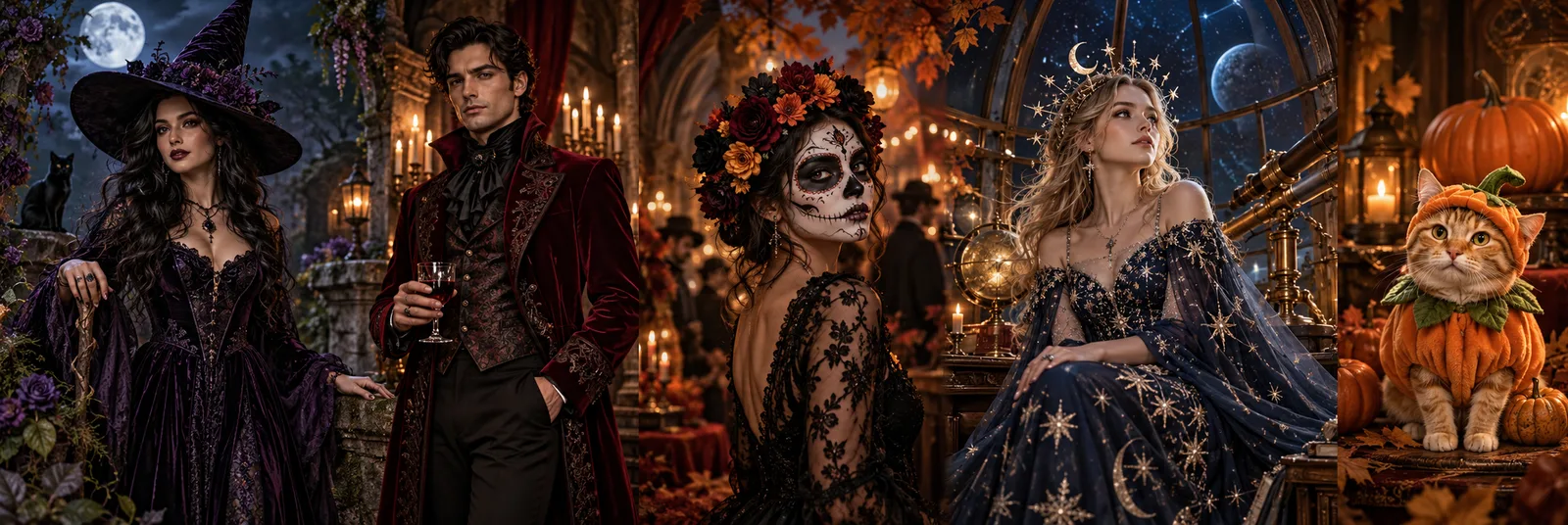
Explore a classic witch, a cinematic vampire, skeleton makeup, a celestial princess or a pumpkin pet. These Halloween AI presets are editable starting points, not fixed filters. The selected image model interprets your reference photo, outfit and background together.

Illustrative Halloween moodboard: gothic witch, vampire, skeleton makeup, cosmic princess and a cat in a pumpkin costume
AI-created style illustration, not a before-and-after comparison or a verified output from the selected King AI model. Your result will vary with the model, prompt and reference photo.

01

Gothic Witch

Black-and-purple velvet, a pointed hat and a moonlit garden. A classic Halloween portrait with soft fog and lantern light.

Photo tip: Use a clear waist-up portrait with your face and shoulders visible.

View the Editable Prompt

Edit the uploaded photo as the primary reference. Keep the subject recognizable: preserve facial features, skin tone, approximate age, body proportions and natural anatomy. Keep the same pose and number of people. Change only the costume, styling and setting described below. Dress the subject in an original gothic witch costume: an elegant black-and-purple velvet outfit, delicate silver accessories and a pointed witch hat that leaves the face visible. Set the portrait in a moonlit autumn garden with glowing lanterns and gentle mist. Use photorealistic editorial photography, realistic fabric and natural lighting. Avoid extra people, duplicated limbs, distorted hands, text, logos and watermarks. No blood or graphic injury.

Choose a Look in the Generator ↑

02

Vampire Portrait

A burgundy cape, tailored evening wear and candlelit castle details. Aim for theatrical elegance rather than graphic horror.

Photo tip: Choose a front-facing portrait with even light and no face covering.

View the Editable Prompt

Edit the uploaded photo as the primary reference. Keep the subject recognizable: preserve facial features, skin tone, approximate age, body proportions and natural anatomy. Keep the same pose and number of people. Change only the costume, styling and setting described below. Create an original elegant vampire costume portrait. Add a burgundy cape, a tailored dark evening outfit and a small antique pendant. Keep the original skin tone and recognizable face; use subtle theatrical makeup rather than changing facial structure. Place the subject in a candlelit castle hall with warm highlights and cool moonlight. Use photorealistic editorial photography, realistic fabric and natural lighting. Avoid extra people, duplicated limbs, distorted hands, text, logos and watermarks. No blood or graphic injury.

Choose a Look in the Generator ↑

03

Skeleton Makeup

Black-and-white skeleton face paint, a dark party outfit and warm pumpkin lights. Keep the face visible beneath the makeup.

Photo tip: Use a close portrait without sunglasses so facial landmarks remain visible.

View the Editable Prompt

Edit the uploaded photo as the primary reference. Keep the subject recognizable: preserve facial features, skin tone, approximate age, body proportions and natural anatomy. Keep the same pose and number of people. Change only the costume, styling and setting described below. Apply tasteful black-and-white skeleton face paint following the subject's existing facial landmarks without changing bone structure. Add a dark Halloween party outfit with subtle silver details. Place the subject at an autumn party with warm pumpkin lanterns and softly blurred orange lights. Keep the eyes recognizable and the expression natural. Use photorealistic editorial photography, realistic fabric and natural lighting. Avoid extra people, duplicated limbs, distorted hands, text, logos and watermarks. No blood or graphic injury.

Choose a Look in the Generator ↑

04

Cosmic Princess

A navy gown with silver star embroidery, a moon crown and observatory light. A softer fantasy alternative to spooky costumes.

Photo tip: Use a waist-up or full-length photo to give the gown room in the frame.

View the Editable Prompt

Edit the uploaded photo as the primary reference. Keep the subject recognizable: preserve facial features, skin tone, approximate age, body proportions and natural anatomy. Keep the same pose and number of people. Change only the costume, styling and setting described below. Create an original celestial Halloween princess costume: a midnight-blue gown with silver embroidery and softly glowing star patterns, a delicate silver moon crown and realistic flowing fabric. Place the subject inside a moonlit observatory with a starry sky beyond tall windows. Use a deep-blue, silver and violet palette. Use photorealistic editorial photography, realistic fabric and natural lighting. Avoid extra people, duplicated limbs, distorted hands, text, logos and watermarks. No blood or graphic injury.

Choose a Look in the Generator ↑

05

Pumpkin Pet

A soft pumpkin outfit for a cat or dog, with a small leaf accessory and a cozy autumn studio. Keep the animal’s features visible.

Photo tip: Upload one clear pet photo with the eyes, ears and body unobstructed.

View the Editable Prompt

Use the uploaded pet photo as the primary reference. Preserve the animal's species, breed, fur color, distinctive markings, eyes, face and natural anatomy. Keep the original pose and number of animals. Dress the pet in a soft pumpkin-inspired Halloween costume with a small green leaf accessory. Do not cover the eyes or ears, change its species or add human features. Place the pet in a cozy autumn photography studio with miniature pumpkins and warm soft lighting. Use photorealistic pet photography with realistic fur and shadows. Avoid extra animals, unnatural paws, duplicated limbs, text, logos and watermarks.

Choose a Look in the Generator ↑

How to Try a Halloween Costume on Your Photo

Use the same King AI image controls you already know, with a seasonal prompt ready to customize.

  1. 1

    Upload a Clear Reference

    Start with one well-lit photo of yourself or your pet. A waist-up or full-body photo gives the model more room to change clothing. Follow the upload limits shown by your selected model.

  2. 2

    Choose and Customize a Look

    Select one of the five costume presets above. It fills the image prompt without removing your uploaded photo. Edit the outfit, colors or background before continuing.

  3. 3

    Review, Generate and Download

    Check the selected model, settings and credit requirement, then submit when ready. Review the face, costume and anatomy in the result before downloading or trying another variation.

Halloween Costume Generator FAQ

Photo tips, preset behavior and what to expect from an AI costume edit.

What does the AI Halloween costume generator do?

It uses your reference photo and a written prompt to request a Halloween costume edit in the King AI image workspace. Choose Gothic Witch, Vampire Portrait, Skeleton Makeup, Cosmic Princess or Pumpkin Pet, then customize the prompt and submit. This is a generated image, not a live camera filter or a physical clothing fit prediction.

Will my face stay exactly the same?

The presets ask the model to preserve recognizable facial features, but identity preservation is not guaranteed. Use a clear, evenly lit reference with the face visible. If the face changes too much, simplify the makeup or costume instructions and try another supported image model. Always inspect the result.

Does choosing a preset start generation or spend credits?

No. A preset only replaces the editable image prompt. It does not remove reference photos, change model settings or submit a generation. You review the credit requirement and start generation yourself using the existing submit control. Account, quota and pricing rules remain the same as elsewhere on King AI.

Can I change a preset after uploading my photo?

Yes. Switching a costume preset keeps your uploaded references and settings. It replaces the current prompt, including any manual prompt edits, so save wording you want to keep first. Preset switching is disabled while uploading or generating, or while a submitted request still needs to be resolved.

Can I make a Halloween picture of my cat or dog?

Choose Pumpkin Pet and upload a clear photo of one animal. The prompt asks to preserve its species, markings and anatomy while adding a soft costume. Check paws, eyes and ears in the output. Pet identity and costume details depend on the selected model and source photo.

Is the Halloween costume tool free?

The page and preset prompts are available to explore. Image generation follows the existing King AI account, guest allowance and model credit rules. Availability and required credits are shown in the generator. Selecting a costume does not create a new subscription or a separate Halloween charge.

What photos should I upload?

Use photos you own or have permission to edit. Prefer a sharp image with one visible subject, natural lighting and room around the clothing. For a full costume, use a full-body photo. File formats, size and image-count limits depend on the selected model and are shown next to the upload control. Review the privacy settings before submitting.

Can I turn a Halloween image into a video?

You can download a result you like, switch to the existing Video workspace and upload it as an image reference for a supported image-to-video model. Describe small movements such as blinking, a slight head turn or drifting fog. This is a separate generation with its own settings and credit requirement; choosing a costume does not start a video.